
Product story
Folder sync that feels at home on every system
Nextcloud Native connects ordinary device folders to Nextcloud with two-way sync, visible conflicts, selective rules, and system file integration.
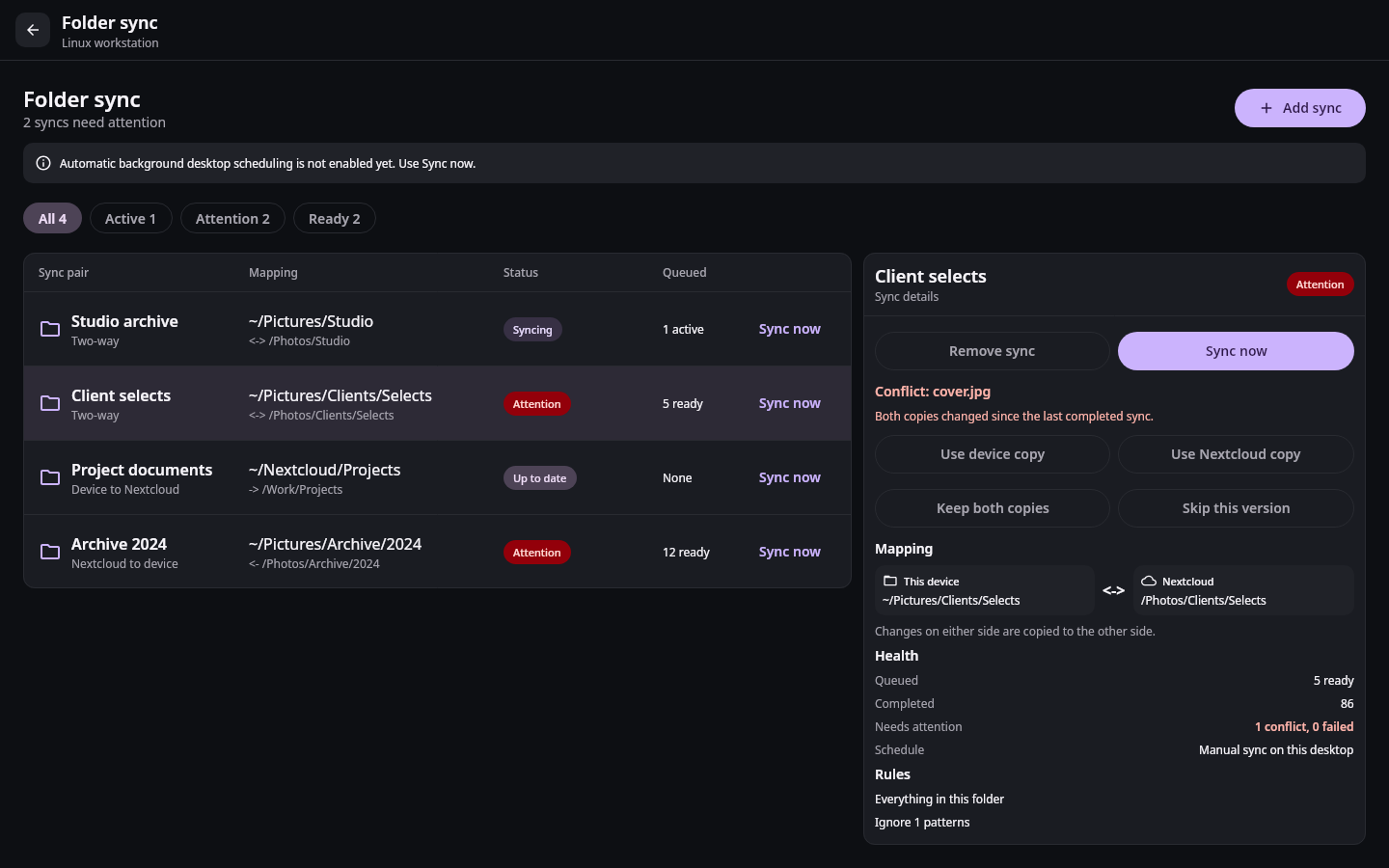
A synchronized folder should still feel like a folder. A photo editor should be able to open it. A notes app should be able to write into it. A terminal, file manager, or system picker should see normal names and normal files without requiring a special export step. Nextcloud should remain the server that connects those devices, not a reason to replace the tools already used on them.
Nextcloud Native builds folder sync around that idea. You choose a local folder and a folder in Nextcloud, decide which direction changes may travel, and keep the result visible in the operating system. The same safety rules apply on Android, iOS, Linux, macOS, and Windows, while each system gets the integration that belongs there.
A folder pair starts with two real locations
Setup begins with the device's own folder picker. On a phone that may be a document tree or a folder exposed through the system Files app. On desktop it is an ordinary directory such as a project, photo library, or notes folder. Nextcloud Native then opens a native remote browser for the other side of the pair. Nobody has to type a DAV path, account identifier, or internal file ID.
Before the pair is saved, the review screen names both locations and the Nextcloud account that owns the relationship. It also explains the direction:
- Two-way sync carries verified changes in either direction.
- Upload-only sync is useful for capture and backup folders.
- Download-only sync keeps a local working copy of shared server content.
The direction belongs to the pair. A camera folder can upload to one account while a shared studio folder synchronizes both ways with another. The app never relies on a global destination that quietly changes the meaning of existing folders.
Selective rules belong beside the folder
Large folders rarely need one universal policy. A photographer may want RAW files to move first, ignore temporary previews, and leave exported video until an unmetered connection is available. A software project may include build directories that should never cross the network. A notes vault may need every Markdown file and attachment but not a device-specific cache.
Nextcloud Native keeps include, exclude, and priority rules with the folder pair. The setup flow offers useful presets, then exposes the actual rules for review. Selective browsing uses the same verified remote identities as Files, so choosing a subfolder does not turn a display label into a guessed path.
Network and power preferences are pair-specific too. A small notes folder can run on any connection while a media archive waits for Wi-Fi and a healthy battery. Manual sync remains available when an automatic run is waiting for those conditions. The status screen says why work is waiting instead of leaving a motionless progress bar.
Conflicts are decisions, not error codes
Two-way sync has to assume that both copies can change. A laptop may edit a document while a phone is offline. A rename can meet a remote deletion. The same relative path can point to revisions that no longer descend from the last version both sides agreed on.
Each completed operation therefore records revision evidence for both locations. A later plan compares the current local and remote revisions with that synchronized baseline. Uploads, downloads, renames, and deletions only proceed against the versions they were planned for. If the evidence changes while work is running, the operation returns to reconciliation instead of overwriting the newer copy.
When both copies changed, the folder sync center shows the conflict with its folder, relative path, and reason. The available choices are explicit: use the local copy, use the remote copy, keep both, or skip the item for now. Keeping both produces a recoverable result; it is not a hidden side effect of an automatic retry. A failure on one file also stays attached to that file rather than making the entire folder look vaguely broken.
The journal survives the screen and the process
The sync engine does not live inside the progress view. Folder identities, baselines, planned operations, attempts, conflicts, and verified results are stored as durable account-scoped state. If the app or operating system stops a worker, the next run can tell which work was planned, which operation was in flight, and which postcondition still needs verification.
That separation keeps the interface bounded. The main view summarizes each pair and opens a detailed inspector when needed. Active, ready, and attention filters make a large collection manageable. Completed history does not become thousands of live cards, and a tray or status surface can show useful progress without owning the journal itself.
On desktop, start-on-login and the live tray keep synchronization present without requiring the main window to remain open. The tray distinguishes active work, waiting work, and conflicts, then leads back to the exact pair that needs attention. On mobile, background scheduling follows the operating system's network, battery, and lifecycle rules while manual foreground work remains understandable.
Native files can be local or on demand
Some workflows need a conventional mirrored folder. Editors, developer tools, Git, and Obsidian expect repeatedly writable local files and benefit from having the whole selected tree available offline. Other workflows are better served by virtual files: the hierarchy appears in the system file browser while content is downloaded when an application opens it.
Nextcloud Native supports both models. Android exposes Nextcloud content through the system document provider. Windows uses Cloud Files integration, Linux provides a filesystem mount, and Apple platforms use their native file-provider model. Hydrated content is cached with its account, remote identity, revision, and byte range. Pinned files are protected for offline use, while unpinned content can be released under a visible storage policy without deleting the server copy.
Writable virtual files use the same revision rules as synchronized folders. A local write is staged, checked, and reconciled against the remote version. Temporary or partial bytes are never presented as a complete file. If a provider loses access or the network disappears, the system gets a real availability result instead of a successful open backed by incomplete content.
One map of the folders that matter
The finished experience is deliberately ordinary: choose two folders, see their relationship, and keep using the applications already built around files. The native sync center exists for the moments that are not ordinary. It shows whether a pair is healthy, what is moving, what is waiting, and which exact decision needs a person.
That is what lets folder sync disappear during normal work without becoming invisible when correctness matters. Nextcloud remains in charge of the remote data, the operating system remains in charge of local file access, and Nextcloud Native maintains the verified relationship between them.
Delivery roadmapAdaptive native apps0.5 Adaptive apps In progress View linked issues
Looking for concise version-by-version changes? Read the changelog.